
Android OS
1. Find and launch the Email app from your App Launcher.

2. At the Set up email screen, enter your email address & password for this email, then click on Manual Set Up.

3. For What type of account is this? Select the POP3 button.

4. For Incoming Server Settings, input as follows:
POP3 Server: clientmail.sitedudes.com
Port: 995
Security Type: SSL/TLS
Delete email from server: Never (Important)
5. For Outgoing Server Settings, input as follows:
SMTP Server: clientmail.sitedudes.com
Port: 465
Security Type: SSL/TLS
Select “Authentication required” (if prompted)
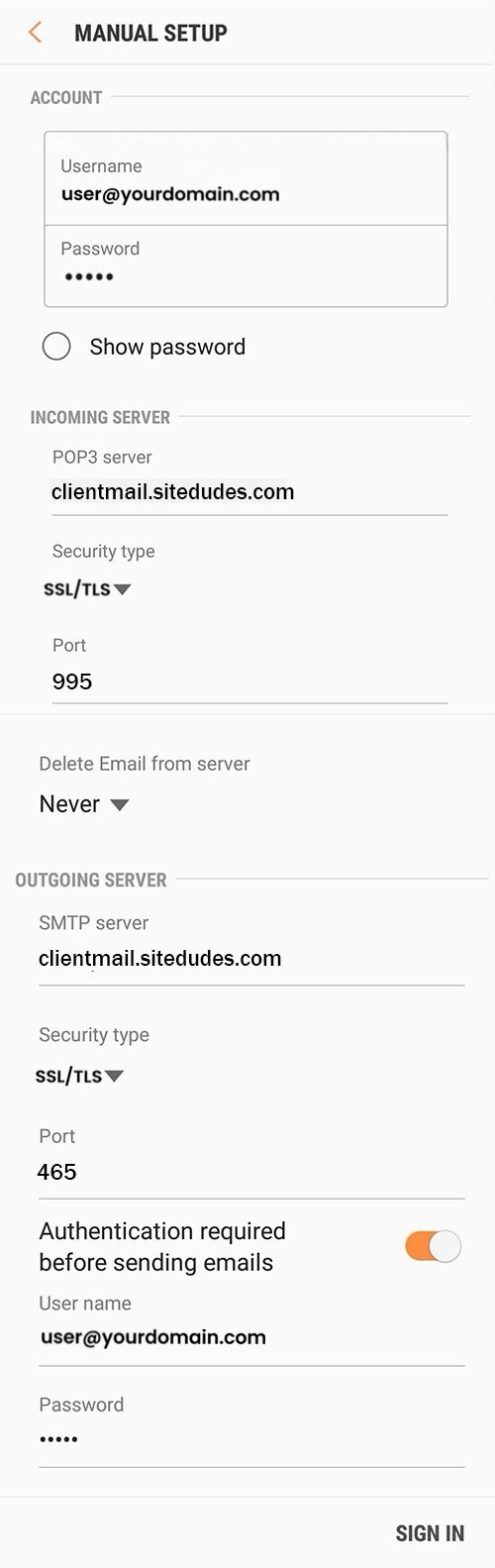
Click on the “Sign In” button.